
HYROX race training for iPhone

Your HYROX plan,
built backward from race day.

Set your race date, available training days, equipment and experience. FORM2 builds the complete block, including running, strength, stations, taper and race week.

No performance history required to build your plan. The finish forecast unlocks later from real training.

Already raced? Find your result and splits
YOUR RACE BLOCK

HYROX Cairo

9WEEKS
Open5 days/weekFull gym
W1–4Build the engineBUILD
W5–7Race-specific workPEAK
W8Reduce fatigueTAPER
W9Arrive readyRACE
NEXT SESSION Compromised running + sleds Tuesday · 58 min
Your plan starts with
Race date Division Training days Equipment Experience
From race date to next session

A block you can actually follow.

No generic twelve-week PDF. FORM2 works from your event and your constraints, then makes the next piece of work obvious.

01

Set the finish line

Add your race date, division and experience. First race is fine.

02

Fit the plan to your life

Choose the days you can train and the equipment you can use.

03

Train through race week

Follow running, strength and station sessions through peak and taper.

Train for the whole event

Running and stations belong in one plan.

A HYROX is not a running plan plus random functional workouts. FORM2 coordinates the aerobic work, strength, all eight stations and compromised running across the same dated block.
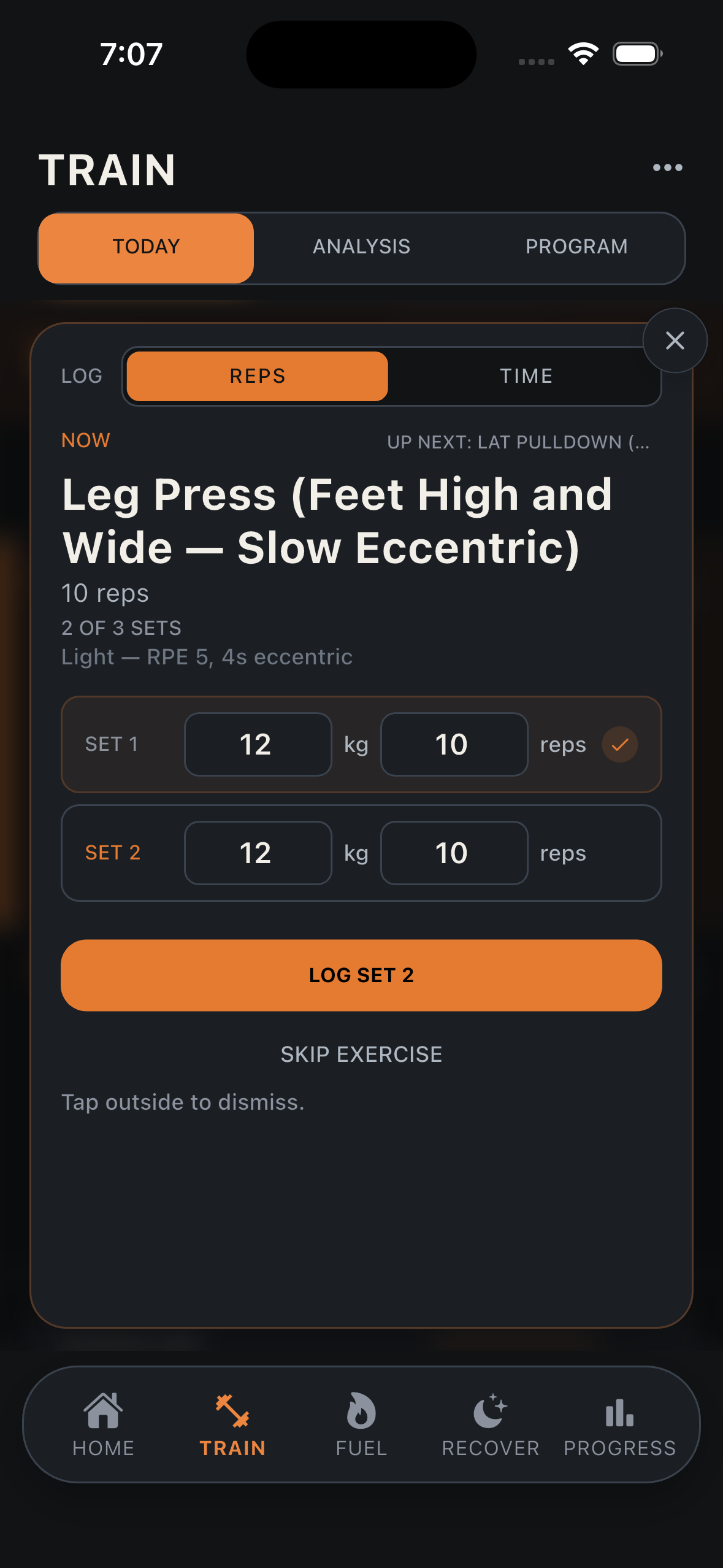
  • Complete race structure. Running, strength, stations and transitions.
  • Progressive phases. Build, peak, taper and race week.
  • Daily clarity. Open FORM2 and see the next session.
  • Real constraints. Your schedule and equipment shape the plan.
FORM2 workout logger
Already raced?

Search your name. Find every split.

Find your published HYROX result, confirm the matching race and import the performance that actually happened. FORM2 turns your last finish into evidence for the next block.
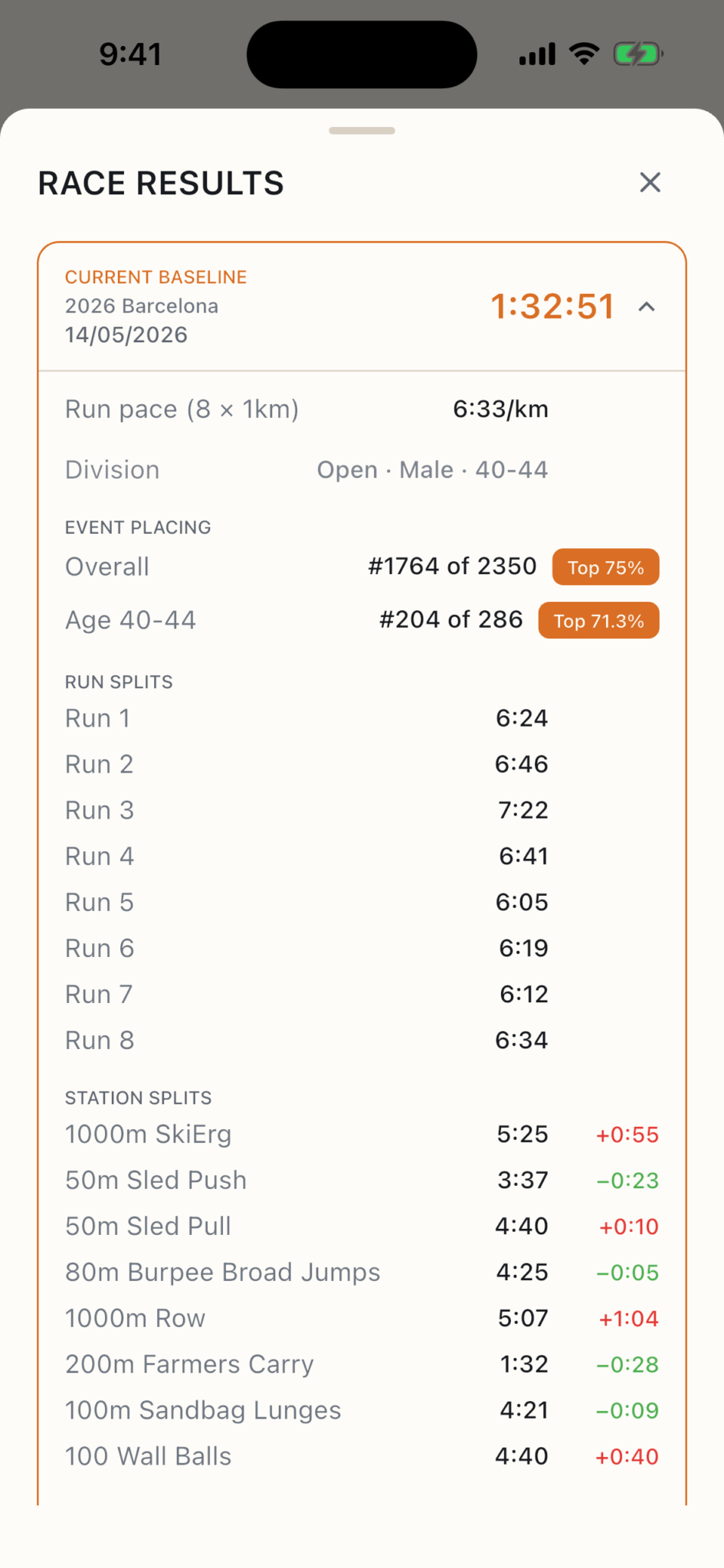
  • One name search. No manual transcription across a long results page.
  • The complete race. Finish time, Roxzone, eight station splits and eight run splits when published.
  • A real baseline. See where time went and build the next plan around real performance.
FORM2 race result showing finish time, placing, run splits and station splits
Evidence before precision

Train first. Earn a forecast you can trust.

A new athlete should not see an invented finish time. FORM2 waits for usable evidence, then unlocks a forecast with a confidence range and the stations most worth improving.

Recent runConnect Health or log 1 km+
Station effortRecord a qualifying benchmark
Prior raceImport or enter your result
FORECAST LOCKED

No made-up number.

Build your plan now. Log a recent run, station effort or prior race to unlock a personal finish range.

0 of 1 usable signals
Already have a coach?

Keep the coach. Lose the spreadsheet.

Import a PDF, screenshot or WhatsApp plan. FORM2 turns it into a program you can follow, log and carry into every session.

  • Import common formats. Documents, images and pasted text.
  • Review before saving. You stay in control of the final program.
  • Track execution. Sessions, sets, loads and progress in one place.
PDFCoach_Block_July.pdf
FORM2 PROGRAM8 weeks · 5 days/weekReady for your review
One race plan. A complete support system.

Fuel and recover around the work.

The plan is the front door. FORM2's wider toolkit helps you execute it without splitting your race across disconnected apps.

Train

Structured sessions, live workout logging, progressive overload and training load.

Fuel

Food logging, macros, micronutrients and energy targets beside the plan.

Recover

Readiness from the heart, sleep and training signals you choose to connect.

Progress

Strength, body composition, habits, bloodwork and long-term trends.

Want to see everything FORM2 can do?

Explore the complete product map, including the small tools and automatic adjustments working behind the plan.

Explore every feature
The complete product map

The HYROX plan is the front door.
Here is the whole house.

FORM2 brings race preparation, training execution, nutrition, sleep, recovery and long-term progress into one athlete system. Open any category to inspect every capability.

100+capabilities
9connected systems
1race-focused front door
01 HYROX plans, races and forecastingPlanning the block and learning from race evidence
  • Build a complete HYROX block backward from the athlete's race date
  • Personalize the block by division, experience, weekly training days and equipment
  • Plan running, strength, all eight stations, compromised running and transitions together
  • Progress through build, peak, taper and race-week phases
  • See the current phase, week and next planned session
  • Adapt station work when race-standard equipment is unavailable
  • Choose Open, Pro, Doubles and other supported race divisions
  • Search an athlete's name across the published HYROX race catalog
  • Match the correct athlete by event, division, nationality and result details
  • Import a published finish time, Roxzone, placing, eight run splits and eight station splits
  • Review and confirm every published result value before saving
  • Import a past result from a screenshot when name search is not suitable
  • Paste or enter a past HYROX result manually
  • Keep a history of HYROX races and station performance
  • Track personal records for individual HYROX stations
  • See station trends across more than one race campaign
  • Generate a finish forecast only after usable training or race evidence exists
  • Show a confidence range instead of pretending thin evidence is precise
  • Use recent run pace, station efforts and prior races as forecast signals
  • Identify the stations with the largest improvement opportunity
  • Build pacing, heart-rate-zone and effort guidance for race day
  • Generate a HYROX race-fuelling protocol
  • Flag race-health considerations that deserve attention before the event
02 Programs and workout executionFrom imported plan to the final logged set
  • Build a general strength, hypertrophy or fitness program
  • Build individual workouts manually
  • Generate a one-off workout from a written request
  • Add or replace today's workout without changing the full program
  • Import a coach's program from a PDF, image, camera photo or pasted text
  • Review an imported program before saving it
  • View a program report card and quality checks
  • Schedule training across the week
  • Open directly into today's planned session
  • Run a guided workout one exercise block at a time
  • Log weight, reps, duration, distance and completed sets
  • Copy previous-set values for faster logging
  • Use live station timers for timed HYROX efforts
  • Automatically distinguish HYROX station timing from ordinary strength sets
  • Auto-start a rest timer after a logged set
  • Add time, skip rest or collapse the rest timer while training
  • Use countdown, interval, stopwatch and lap-timer modes
  • Keep workout timing visible through a Live Activity
  • Receive workout countdown beeps and haptic feedback
  • Use the built-in calculator during a session
  • Convert pounds and kilograms
  • Convert miles and meters
  • Convert running pace per mile and per kilometre
  • See estimated session duration before starting
  • Record a session as completed or stopped early
  • Get an end-of-session summary and newly earned personal records
  • Write completed workouts back to Apple Health
  • Automatically suggest progressive overload from set history
  • Autoregulate target load from readiness and recent performance
  • Insert a lighter recovery session when fatigue signals call for it
  • Preserve exercise consistency across a block so progress is measurable
03 Training analysis and performanceWhat the athlete did, how hard it was and what is improving
  • Review weekly training volume
  • See the most trained exercises over the last 30 days
  • See the most trained muscle groups
  • Review personal records by exercise
  • Browse the full session log
  • Edit or delete an individual workout entry
  • Delete an entire session without affecting other sessions
  • Track sessions, completed sets and all-time totals
  • Calculate training load from logged work and connected workouts
  • Classify current load as low, medium, high or peak
  • Compare acute and longer-term workload
  • Estimate one-rep-max trends from logged sets
  • Track overall strength and progress by muscle group
  • Highlight muscles that are gaining, stable or stalling
  • Estimate VO2 max from Apple Health data
  • Show the athlete's cardio-fitness range for age and profile
  • Review recent cardio activity
  • Track 5K, 10K, half-marathon and marathon races
  • Track triathlon performance
  • Create and track a custom race format
  • Project future race pace from training evidence
  • Use the logged session history as the source of truth for pacing
04 Nutrition, meals and eating outDaily targets that respond to training and real life
  • Build a personalized multi-day nutrition plan
  • Build separate training-day and rest-day meal options
  • Import a meal plan from a PDF, image or camera photo
  • Build a meal plan manually
  • Maintain several meal-plan options and switch between them
  • Automatically select meal-plan options by weekday
  • Choose today's day type manually or let FORM2 detect it from training
  • Track calories, protein, carbohydrates and fat against daily targets
  • Track fiber, vitamins, minerals and extended micronutrients
  • See the next planned meal and its timing context
  • Log planned meals with one tap
  • Add a custom meal or individual food
  • Describe a meal in text and receive a nutrition estimate
  • Photograph food for an editable nutrition estimate
  • Scan a packaged-food barcode using Open Food Facts data
  • Search for a food by name or barcode digits
  • Edit portions and nutrition values before logging
  • Write logged nutrition to Apple Health
  • Scan a restaurant menu QR code and resolve its linked menu
  • Photograph several menu pages in one scan
  • Upload multiple menu images or a menu PDF
  • Mix QR, photo and file sources in one menu analysis
  • Get a top restaurant pick plus ranked alternatives
  • Choose dishes against calories and macros remaining that day
  • See suggested order modifications and estimated macros
  • Log a recommended restaurant dish after reviewing the estimate
  • Automatically reduce later meal portions after eating over target
  • Show the exact ingredient or macro reductions suggested to compensate
  • Keep protein protected while redistributing carbohydrates and fat
  • Let the athlete log either the adjusted or original planned meal
  • Track the week's cumulative calorie balance across logged days
  • Show how future under-target days can bring weekly balance toward zero
  • Automatically cycle calories for standard, heavy, recovery, deload and rest days
  • Allow each calorie-cycling adjustment to be customized
  • Factor connected calories burned into the day's view
  • Surface longer-term calorie and macro trends
  • Flag consistently low energy intake that may affect recovery
  • Show nutrition insights, fasting analysis and meal history
  • Send meal reminders at planned times with log and snooze actions
05 Hydration, caffeine and fastingSmall daily inputs that change training and sleep
  • Set an automatic water goal from body weight and training profile
  • Override the water goal manually
  • Add water quickly from anywhere in the Fuel tab
  • Remove the last glass or reset the day
  • Receive water reminders with log, snooze and skip actions
  • Track hydration progress through a Live Activity
  • Adjust hydration guidance for long sessions and hot conditions
  • Log coffee, tea, energy drinks and other caffeine sources
  • Use saved drink sizes or enter a custom caffeine dose
  • Backdate a caffeine drink with quick time controls
  • Estimate caffeine remaining in the body right now
  • Estimate caffeine remaining at bedtime
  • Estimate when a caffeine dose will substantially clear
  • Connect late caffeine with recovery and sleep analysis
  • Start and stop a fast manually
  • Choose and schedule a recurring fasting protocol
  • Automatically start and end scheduled fasts
  • Follow fasting milestones and physiological-stage guidance
  • Track fasting streaks, records and a 30-day history
  • Keep an active fast visible through a Live Activity
06 Sleep and active recoveryFrom bedtime preparation to the morning check-in
  • Import sleep from Apple Health and Apple Watch
  • Track sleep with the phone when no watch is available
  • Group overnight sleep segments into one night
  • Fill gaps between wearable and phone-recorded sleep carefully
  • Analyze total sleep, time in bed and sleep efficiency
  • Show deep, REM, core and awake stages when available
  • Build a visual sleep-stage timeline
  • Review seven-day sleep duration and quality trends
  • Calculate sleep debt
  • Track naps and a sleep bank against the weekly target
  • Show disturbances and factors associated with sleep
  • Connect HRV, caffeine, training and recovery contributors to sleep
  • Create a personalized bedtime and wake routine
  • Generate routine steps from the athlete's schedule and sleep issues
  • Set a smart alarm with a configurable wake window
  • Choose wake sound, snooze behavior and Sleep Focus
  • Keep sleep monitoring visible through a Live Activity
  • Review smart-alarm history
  • Play looping sleep soundscapes
  • Run guided non-sleep deep rest sessions
  • Choose multiple NSDR methods and session lengths
  • Run a guided power nap
  • Complete a morning check-in after waking
  • Write FORM2-recorded sleep back to Apple Health
07 Readiness, recovery and body progressWhat is recovered, what is changing and what to do today
  • Calculate a composite daily readiness signal
  • Combine sleep quality, muscle freshness and training-load balance
  • Show the weakest readiness contributor in plain language
  • Track HRV-based heart recovery
  • Show longer-term HRV trends
  • Estimate recovery separately for each muscle group
  • Show which muscles were worked during the week
  • Recommend recovery actions based on the limiting signal
  • Adjust today's training recommendation when recovery is low
  • Track body weight, body-fat percentage and muscle percentage
  • Import body metrics from Apple Health
  • Calculate BMI and body-recomposition trends
  • Take progress photos with front-camera support
  • Add progress photos from the photo library
  • Use a timed progress-photo capture
  • Review progress photos by date
  • Import InBody, DEXA, Tanita and similar scans from image or PDF
  • Extract scan measurements for review before saving
  • Calibrate smart-scale trends against a higher-quality body scan
  • Preserve and reopen the source scan beside its measurements
  • Reorder the Progress sections around the athlete's priorities
08 Longevity, habits and protocolsLonger-horizon health context and behavior change
  • Estimate a composite body age from fitness, strength and body signals
  • Upload a blood-work PDF for athlete-focused analysis
  • Extract and explain individual blood markers
  • Classify markers as training optimal, potentially performance affecting or worth discussing
  • Estimate performance age with a confidence range
  • Show the factors working for the athlete and areas to improve
  • Generate training recommendations from blood-work context
  • Generate nutrition and supplement considerations
  • Compare performance-age estimates across uploads
  • Keep a history of up to 20 analyzed panels
  • Track quitting smoking, alcohol and other configurable habits
  • Set a quit date and personal reason
  • Track time free from the habit
  • Calculate money saved over time
  • Show health and behavior milestones
  • Record a relapse without erasing the history that came before it
  • Restart the streak and continue from the setback
  • Review streak history and relapse patterns
  • Track medicines and supplements
  • Add a single medicine or supplement manually
  • Scan a medicine or supplement label with the camera
  • Import a multi-day protocol schedule from an image or file
  • Build multi-substance, per-date medication protocols
  • Schedule dose, cycle, start and optional end dates
  • Receive medication reminders and log doses
  • See today's protocol, the full cabinet and dose history
  • Keep active medication timing visible through a Live Activity
09 Coach, dashboard, integrations and dataThe connective layer across every system
  • Ask Luma about training, recovery, nutrition, sleep or race preparation
  • Give the coach context from the screen the athlete is currently viewing
  • Let the coach use the athlete's own recent data in its answer
  • Attach a photo or file for the coach to inspect
  • Speak a question instead of typing it
  • Hear a coach briefing spoken aloud
  • Copy, edit and resend coach messages
  • Browse coach conversation history
  • Receive a daily coach briefing
  • Open a morning brief with current sleep and recovery context
  • See cross-system insights, such as sleep affecting training
  • Customize the home dashboard cards
  • Reorder and hide quick actions
  • See this week's training progress, race countdown and current load at a glance
  • Track days where training, fueling and sleep were all completed
  • Connect Apple Health for heart rate, HRV, workouts, sleep, steps, energy and body metrics
  • Refresh connected health data on demand
  • Use metric or imperial units across the app
  • Use light, dark or system appearance
  • Configure coach, meal, water and medication notifications
  • Sync account data and restore it on a new device
  • Continue locally before creating an account
  • Recover recently deleted supported items from Trash
  • Access an in-app help center organized by product area
  • Send feedback from inside the app
  • Delete the account and associated FORM2 data from inside the app

Capabilities depend on the data and device permissions the athlete chooses to provide. Health, sleep, nutrition and blood-work guidance is for fitness reference and is not medical advice.

Your race is already getting closer

Give every week
a clear job.

Build your HYROX block around the days and equipment you actually have.

Download on the App Store