How Free60 Gets Your Data Across Three Dimensions
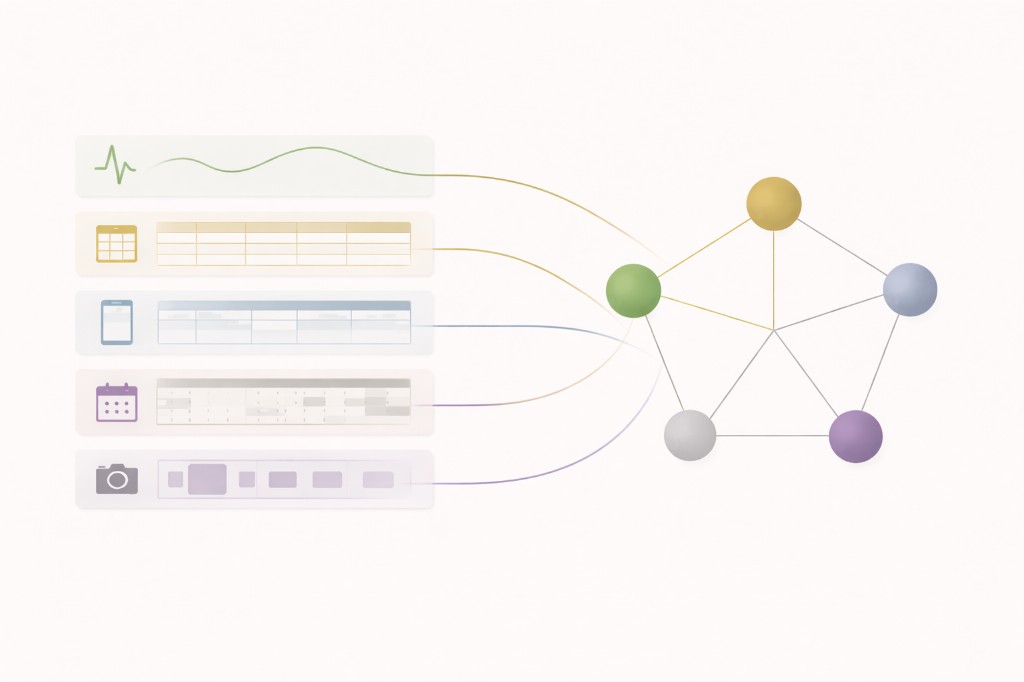
Free60 is the diagnostic layer. It scores life stability on a 0-360 Freedom Index (scaled when you activate fewer than three dimensions). Diagnostics need data. The product is built so automation and integrations handle most of the load; Quick Actions on Home surface the small residual slice that still needs you.
What is a data source?
Every diagnostic reads from somewhere. Free60 uses three dimensions, each with a clear execution story:
Health reads passive physiology from Apple Health (iOS) or Health Connect (Android). Wealth is entered and updated in the app, with broker linking and fast expense capture where you enable them. Capacity combines calendar-backed reads (schedule shape, buffer gaps, some boundary checks) with short in-app modules on lever pages for priorities, focus, and routine.
The pipeline is the same everywhere:
- Capture. Sensors, calendar, integrations, or structured in-app inputs record facts.
- Normalize. Calculators turn raw inputs into comparable signals (rolling baselines, thresholds).
- Score. Signals roll up to KPIs, levers, dimensions, and the Freedom Index.
How does each dimension get its data?
Health: Apple Health / Health Connect
Free60 reads heart rate, HRV, sleep analysis, steps, exercise minutes, and resting heart rate. That powers seven automated KPIs across Sleep (consistency, quality, efficiency), Activity (sufficiency, distribution), and Load (autonomic balance, strain trend).
Nutrition and Care use periodic structured input in the app (for example protein targets and care-loop status). They are part of the Health dimension, not a separate product surface.
Wealth: In-app + integrations
All five Wealth levers run inside Free60: Income, Expenses, Liquidity, Investments, and Risk. You configure targets and refresh when something changes or when a review is due. Fast capture paths (photo, voice, manual) cover the expense slice without turning the product into a daily ledger.
The optional Wealth Tracker Google Sheet remains a spreadsheet workspace for people who prefer to model finances outside the app, then sync summary inputs. It is not required for the default path.
Capacity: Calendar + lever OS modules
Schedule (distribution drift) maps calendar categories to planned time allocation. Buffer (buffer availability) scans for real gaps in your calendar. Buffer also includes boundary checks: some protected windows can be validated against overlapping events; other boundary types stay manual because the calendar cannot see intent.
Routine (rhythm stability and execution friction) uses recurring calendar anchors where they exist; process-quality signals (handoffs, rework) stay short structured inputs. Priorities and Focus collect commitments, focus blocks, and review loops in the OS sections embedded on their lever pages.
Optional: the Capacity Tracker spreadsheet adds a weekly grid for users who want a workbook view on top of the same KPIs.
What does the total time commitment look like?
Passive: wearables keep Sleep, Activity, and Load current whenever you open the app.
When prompted: Quick Actions on Home route to whatever dimension currently needs a touch (stale manual KPI, new expense burst, commitment review).
Periodic: Wealth refreshes when your financial picture changes; Nutrition and Care update on their natural cadence; Capacity manual fields stay short (often seconds to a few minutes).
The design goal matches the friction model: automation first, integrations second, minimal residual manual work, surfaced at the right time instead of buried in daily forms.
Why this architecture?
Data should live where it is easiest to maintain. Physiology belongs in Apple Health / Health Connect. Calendar truth belongs in your calendar. Financial structure belongs in tools built for money, with Free60 as the diagnostic reader, not a second bookkeeping system.
Free60 is not a "do everything" app. It is the diagnostic layer that sits above those sources and returns one structural read: the Freedom Index and the lever signals underneath it.
Common questions
Does Free60 require external apps?
Health uses Apple Health (iOS) or Health Connect (Android). Wealth and Capacity run primarily inside Free60, with calendar access and optional broker linking where you turn them on. You do not need Notion or a parallel productivity stack for the core workflow.
How much time does logging take per week?
Most users spend little time "logging": automated Health KPIs update from wearables, calendar-backed Capacity fields update when events change, and Wealth updates are monthly or change-driven. When something needs you, Quick Actions make the path one tap from Home.
What if I don't use Apple Watch?
Automated vitals-based Health KPIs need data from Apple Health or Health Connect. Without a wearable, those KPIs stay empty. Wealth and Capacity still work. Nutrition and Care under Health still accept structured input.
FREE60 is available now on the App Store. 14-day free trial included.
Download on the App Store